Direct the performance.
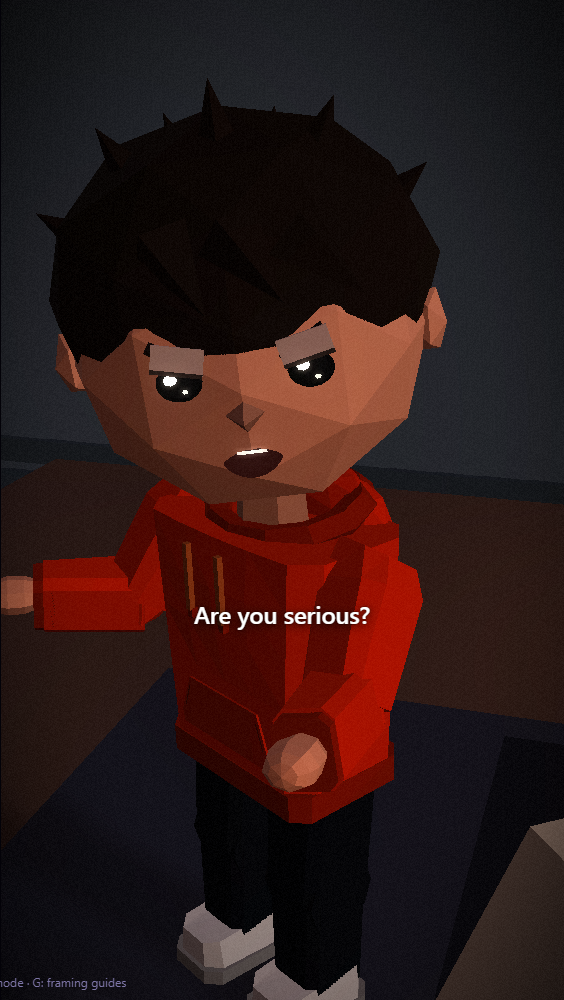
Ask for a close-up, a reaction shot or a pause before the punchline. Your AI shapes the camera cuts, facial expressions and gestures around your story.
 AGENT POLY
THE CREATOR PACK, UPDATED
Give your AI the Creator Pack and describe your next episode. Shape the lighting, camera angles and character reactions in plain language. Your AI handles the code; you direct the story.

Small characters.
Millions of reasons to watch.
INSIDE THE WORKSHOP
LESS SETUP. MORE STORY.A ready-made cast and room, cinematic lighting and a camera system built for storytelling. Turn an idea into a new episode with your AI.
Ask for a close-up, a reaction shot or a pause before the punchline. Your AI shapes the camera cuts, facial expressions and gestures around your story.
Customize the cast in the Character Lab. Ask your AI for warmer light, stronger shadows or a new angle, then review the scene together.
Keep each story in your episode library. Preview it, add your recording or generate voices with your own account, then export with sound and captions.

#ea580cMAKE IT YOURS
Find a palette that feels like you. Explore 60 reference looks here, then customize the updated character and expressive face in the included Character Lab.
These style previews show the earlier character. The updated pack includes eight hairstyles, an expressive face and color controls for your cast. Ask your AI to save your look for every episode.
{ hoodie: "#ea580c", glasses: true, emotion: "happy", action: "wave" }PICK YOUR PACK / KNOW EXACTLY WHAT YOU GET
TWO PRODUCTS. ONE CREATIVE DIRECTION.Go from your first AI conversation to a repeatable animation workflow. A beginner-friendly guide and copy-ready prompts help you build, review and improve your own scenes.
14 modules + 20 copy-ready prompts. No subscription.
New to animation? Start here. Follow the step-by-step guide: open the pack, tell your AI your idea, review the episode and export. No coding experience needed. Ready characters, lighting and cameras give you a starting point; your AI helps you make it yours.
Beginner-friendly. Step-by-step guide. Ready-to-copy AI prompts.
SIDE BY SIDE
| Inside the package | Learn Pack$29 | MOST COMPLETECreator Pack$69 |
|---|---|---|
| LEARN THE CRAFT | ||
| A guide for your pathLearn: 14 modules. Creator: 15-section studio guide. Both: 20 prompts. | ||
| Voice, captions & soundLearn the process; Creator includes the audio workflow | ||
| MAKE THE FILM | ||
| Character & Animation LabLooks, emotions, actions | ||
| Ready episode + directing toolsOne voiced example, room, lighting & camera controls | ||
| Live costume customizationEight hairstyles, clothes, skin, eyes & glow | Explained | Interactive |
| Video export with audio1080 × 1920, captions; MP4 where supported | Explained | |
| Readable studio sourcePrivate adaptation and custom-character examples | ||
| KEEP CREATING | ||
| New episodes with your AIYour idea, camera plan and acting in separate stories | Prompt only | Episode workflow |
| Commercial useWhat you can sell and post | Your original work | Videos + private projects |
| Pay once.Instant download, yours to keep. |
Secure checkout by Lemon Squeezy. We never see or store your card details. Payment, receipts and taxes are handled by Lemon Squeezy, our reseller and Merchant of Record, and your download arrives instantly.
WHAT’S INSIDE / EVERY FILE, EVERY MODULE
NO SURPRISES AFTER CHECKOUT.Illustrated HTML + PDF guide, plus the 20-prompt Prompt Vault.
A complete episode workflow, ready for your AI:
index.html + character-playground.htmlYour episode library + Character LabOpen the supplied voiced episode, browse your own stories and customize the cast in the Character Lab.dist/code-review.htmlOne finished episode to start from“Can you review this code?” includes recorded dialogue, captions and one music track in the production room.engine/ + source/Readable, editable studio sourceShape your characters, movements, lighting and cameras with your AI. Keep control of your studio.skills/creator-episode/ + tools/A new story from your ideaYour AI creates a separate story, builds its own HTML and adds it to your episode library. Keep making episodes with the same cast.START-HERE.pdf + .htmlYour step-by-step setup manual15 illustrated sections: setup, AI handoff, directing, voices, caption alignment, export and troubleshooting.guide/Prompt-Vault.md20 prompts for your production workflowAsk your AI to create stories, refine camera cuts, align voices, check the picture and prepare your next release.LICENSE.txtCommercial creative freedomMake videos and private client projects. Adapt the source privately. Credit is optional; pack redistribution is restricted.THE CREATOR PACK / FROM DOWNLOAD TO YOUR FIRST EXPORT
Start with the illustrated guide. Extract the ZIP, open the library and play the example. It shows you what you can make before you change a thing.
Follow the setup steps, give your AI the folder and copy a starter prompt. Add your idea in everyday words. Watch the result and ask for changes — your AI handles the code.
Follow the voice steps to add a recording or use your own voice-service account. Preview, click export and check your video. Reuse the same steps for your next episode.
A FEW GOOD QUESTIONS
The supplied previews open offline in desktop Chrome or Edge with no installation. Building new episodes with a local AI assistant needs Python 3 and Node.js. Voice processing also needs ffmpeg/ffprobe. The guide walks you through setup; AI services require your own account.
No coding or animation experience is required to get started. The illustrated guide walks you through each step, and copy-ready prompts help you ask for what you want. Give a file-editing AI assistant the extracted pack and describe what you want: a story, warmer lighting, a close-up or a better reaction. Your AI edits and builds the files; you preview and request changes. This is an AI-assisted workflow, so setup and a few rounds of feedback may be needed.
Yes. The Creator Pack includes a single-user license for commercial rendered videos, private source adaptation and integrated private client projects. Credit and watermarks are optional. You may not redistribute the pack or source as a reusable template or asset library. See the license summary.
The included example has recorded dialogue, captions and one music track. For new stories, upload your own recording or use the included ElevenLabs workflow with your own account, voice IDs and credits. Export from the episode page to include enabled audio and burned-in captions. AI subscriptions, API keys and credits are not included.
Give a local coding assistant the extracted folder and ask it to read AGENTS.md. Describe your episode, camera angles and lighting. It creates a separate project, builds an HTML preview and updates the library. In browser-only chat, attach AI-HANDOFF.txt and the current episode HTML; ask for a separately named HTML. That route does not update the editable project automatically.
The readable source includes a working replacement-character example, custom-action examples and adapter instructions. Your AI can help connect your own model or create a new gesture. Arbitrary model files and rigs need adaptation; automatic import and motion capture are not included.
A beginner-friendly 14-module HTML and PDF guide, 20 copy-ready prompts and starting instructions. It teaches the process for your own project. The Creator Pack is the ready-made studio option, with its own 15-section illustrated setup guide and 20 production prompts.
All sales are final: these are digital files you get instantly. If something does not open or work on a supported setup, email us and we will help. See the refund policy for the full terms and applicable rights.
The kit includes the updated low-poly HUMAN and terminal AI shown in the episode previews. The studio’s orange channel mascot and its model source, along with private channel episodes, are not included. You can adapt the supplied demo characters or connect your own using the included instructions.
Production episodes export 1080 × 1920, 30 FPS video with enabled audio and burned-in captions. MP4 requires browser codec support; native capture falls back to MP4 or WebM in real time. Keep the tab visible and check the downloaded video. The lab and feature-control pages retain silent test exports; use the episode page for your finished short.
YOUR FIRST FRAME IS WAITING.